
Launch Sale! The discount lasts until Friday, August 7th.
Real film emulation for professional colorists. Halide simulates the physical properties of photochemical film — halation, grain, emulsion diffusion, and interlayer effects — computed in real time on your GPU inside DaVinci Resolve.
macOS Metal & OpenCL · Windows CUDA & OpenCL
ABOUT THE PLUGIN
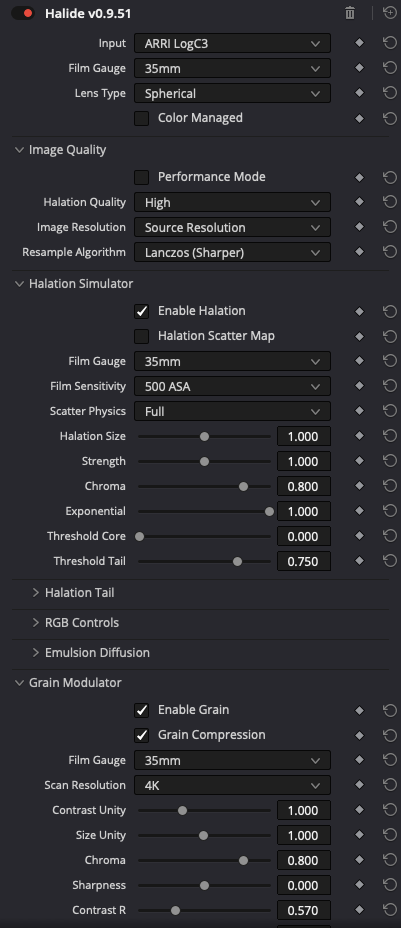
Halide is not like any other texture plugin. It is a physics-informed simulation of the complete photochemical process, emulating film negative texture. Each control maps directly to a real physical mechanism inside the emulsion, giving you the organic texture and character of film that is normally very hard to replicated with static processing. The collection of tools inside this plugin are build separately over years of R&D.
The modules in the Halide OFX are based on physics. While you can never fully replicate everything 100%, this will get you the closest to the film medium in terms of texture. Halation radii and response, grain statistics, diffusion coefficients — derived from actual film stock behaviour, not aesthetic presets.
Full GPU acceleration via Metal, CUDA, and OpenCL. Real-time 1080p and UHD playback on modern hardware with no compromise to your colour grading workflow. While it can run slower on some machines, there are settings inside the plugin that can help you get real time playback during grading.
You can save and load presets that you build right inside the OFX. You can also exchange textures that you build and share them with other colonists or DP’s. This also makes it easy if a custom texture preset need to be send to post facilities.
WHAT IS HALIDE
A film texture OFX plugin for DaVinci Resolve that models the physical behaviour of photochemical film. It is a collection of multiple modules that work together to create a proper film texture on a digital image.
Colorists, DPs, and post facilities working in DaVinci Resolve who want authentic film texture. The controls are so vast that you can create endless texture looks. with over 120 control points it is the ultimate film texture dream tool.
While there are tons of film plugins out there, none of them are getting close of replicating real film texture. Halide is here to fill that gap, and allows colorists to be more creative with texture to get closer to that goal.
Exponential Halation
SEE THE DIFFERENCE
Move the handle left and right to reveal the same shot with and without Halide.

 HALIDE ONWITHOUT
 HALIDE ONWITHOUT
INSIDE THE PLUGIN
Multiple interconnected physical simulations, each independently controllable and tuned to match the behaviour of real photochemical film.
HALATION
Light that passes through the emulsion and reflects from the film base, creating the characteristic warm glow around bright highlights. Scatter radius, intensity, and colour temperature are independently controlled with a large amount of parameters.
GRAIN
Multi-layer grain simulation responding to exposure level, matching the statistical behaviour of actual silver halide crystals. Grain size, clumping, and luminance response scale naturally with image content. There is endless control to change the look of the grain. You can also change the grain size on 3 luminance levels. Course grain in the shadows, find grain in the highlights!
DIFFUSION
Lateral light scattering through emulsion layers adds organic softness without reducing perceived sharpness — exactly as irradiation and subsurface diffusion behave in real film stock.
EDGE
Multiple clarity sliders that mimic the clarity of film, and custom MTF sliders. Adds simplicity to the spatial sharpness of the image to match film sharpness, softness, and clarity.
Resolution
You can do all your texturing in 1080p, and later change the project to UHD and the texture will stay identical in size. Of course a sharper image might need a slight modification, but that is a general resolution thing.
TECHNICAL SPECIFICATIONS
Host Application
DaVinci Resolve 17 or newer
macOS
Metal — Apple Silicon and Intel (recommended)
OpenCL — supported
Windows
CUDA — NVIDIA (recommended)
OpenCL — AMD and Intel (supported)
License
Perpetual license, two machine activations
Deactivate and reactivate at any time
Auto-updating installer
Apple M1 Max
~25 fps at 1080p with all effects active
~25 fps at UHD with Performance Mode enabled
NVIDIA RTX 5070
~25 fps at UHD with all effects active with slightly reduced quality.
Performance Tips
Enable Performance Mode on older or newer GPUs with complex pipelines. Reducing Halation Quality has the greatest impact — the scatter simulation is the most GPU-intensive component. Grain and diffusion run efficiently on all supported hardware.
TRY IT FIRST
A fully-featured, no time-limited version of Halide. See the realistic film texture on your own footage before you buy.
*Perpetual License for DaVinci Resolve. (You will receive an email with a download link and a licence key.)
*Two license activations
(you can deactivate a machine at any time and activate another one)
GPU Support:
MacOS: Metal & OpenCL
Windows: CUDA (NVIDIA) & OpenCL (AMD)
Perpetual License for DaVinci Resolve.
*Floating & site licensing for post-production facilities and teams.
*Activate across multiple workstations and render nodes.
*Priority support, onboarding, and volume pricing.